
YOUR CARS. THEIR RECORDS. ONE WORKSPACE.
Rental fleet management.
Know every car.
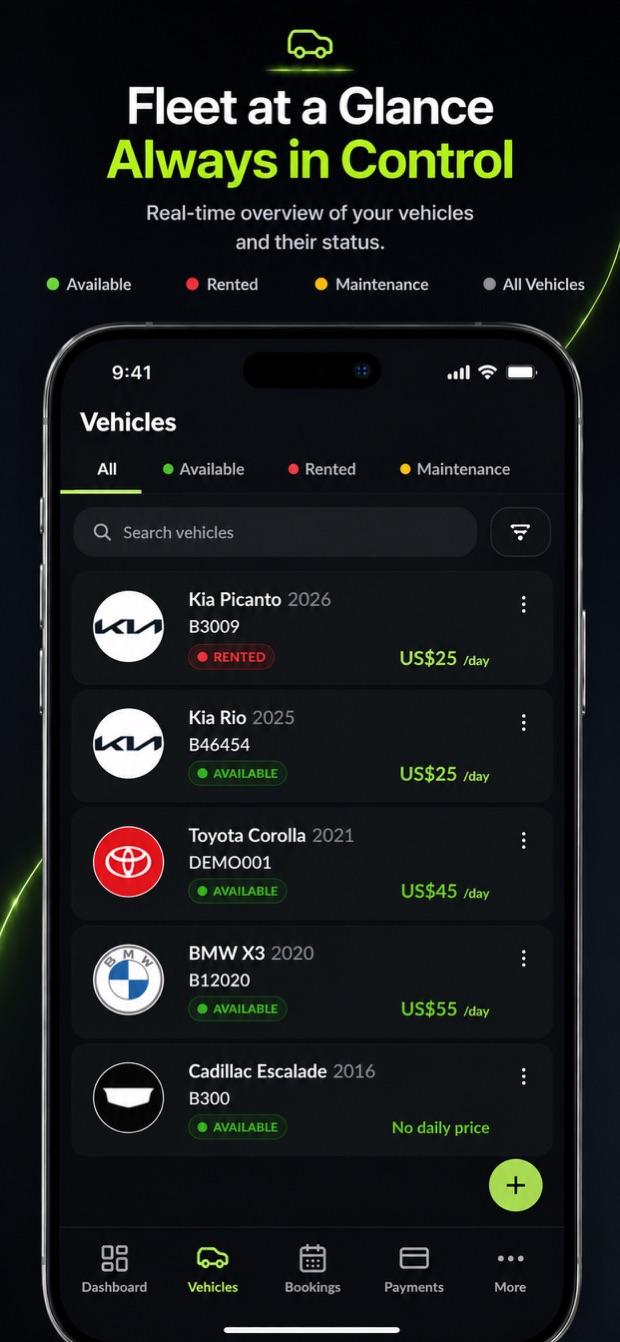
See which cars are available, on rent, or in maintenance. Keep each vehicle's rental history, condition, documents, and expenses close to the team responsible for it.

HOW VROOMOS HELPS
A fleet view built around rental vehicles.
Rental fleet management starts with knowing the state of each car. A vehicle may be available for a reservation, already out with a customer, or held for maintenance. Your team needs that context when assigning a car, planning a pickup, or recording a return.
VroomOS connects the vehicle list with each car's profile and rental records. Open a vehicle to see its photos, documents, mileage, condition, expenses, and history. Keeping these records with the car helps staff find the information they need during rental operations instead of relying on memory or scattered notes.
A CONNECTED RENTAL WORKFLOW
Put it to work in your rental company.
Review the fleet before assigning a car
Check vehicle availability and open the relevant profile. Review the records your team needs for the reservation, then connect the chosen car to the booking. Keep vehicle status and rental progress in view as the rental approaches.
Document the vehicle at handover
Record the car's condition, photos, fuel, and mileage through the pickup workflow your company uses. These details connect the vehicle's state with a specific rental, making the handover record easier to find later.
Build the history through return and service
Record return readings and condition details, and keep damage, maintenance, and expense records associated with the vehicle. Staff can return to the profile when reviewing a car's rental history or preparing it for another booking.
Keep condition records where staff can find them.
An inspection is most useful when the team can relate it to the right vehicle and rental. VroomOS supports vehicle condition photos, damage records, and inspection details alongside the rest of the rental work. At pickup and return, staff can review the relevant records from their phone. The inspection steps available to your team depend on workspace setup.
Compare vehicle limits, team access, and included toolsCOMMON QUESTIONS
Before you get started.
Is this fleet software designed for car rental businesses?
Yes. VroomOS organizes fleet records around rental operations, including vehicle availability, assigned bookings, pickup and return, condition, and rental history. It is used through a company workspace by owners, managers, and authorized staff.
Can staff track mileage and vehicle expenses?
Vehicle profiles include recorded odometer information, expenses, and related rental history. Staff can keep fuel and mileage readings in pickup and return records according to the company's workflow. Review your workspace configuration for the steps your team uses.
How do I choose a plan for my fleet size?
Compare the active vehicle limits, team access, and included tools on the VroomOS pricing page. Plans support different fleet sizes, including an enterprise option for a custom arrangement. Use the published pricing page for current amounts and subscription terms.
CAR RENTAL SOFTWARE. MADE MOBILE.
Your next rental.
All in one workspace.
Feature availability depends on your plan and workspace configuration.